Microsoft recommends that you use third-party backup for your Microsoft 365 data. Barracuda Cloud-to-Cloud Backup offers secure backups, highly granular restore capabilities, and unmatched ease of use.
Flexible, easy-to-use Microsoft 365 protection
Back up your Microsoft 365 Teams, Groups, Exchange, SharePoint, OneDrive, Planner, and OneNote, as well as Entra ID data, and find and recover the exact data you want quickly and easily with advanced search.
Ransomware protection
Your final defense against ransomware and other cyberthreats is your backup, so you need a secure backup that offers role-based access control, encryption, and multiple copies of the data. Malware detection on restore provides additional protection.
Cloud native
Your Microsoft 365 data is already in the cloud — saving secure, encrypted backups in the same network means better performance and instant scalability.

Flexible, easy-to-use Microsoft 365 protection
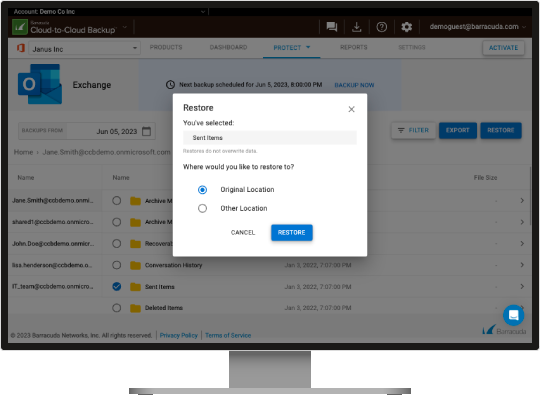
Barracuda Cloud-to-Cloud Backup gives you the flexibility to restore Microsoft 365 Teams, Groups, Exchange, SharePoint, OneDrive, OneNote, Planner, and Entra ID data with highly granular detail.
Barracuda Cloud-to-Cloud Backup offers complete, granular protection of your data with point-in-time retrieval, and both scheduled and on-demand backup. Full SharePoint support means you can backup and restore everything in SharePoint including different site templates, custom lists, permissions, and metadata — eliminating much of the labor and expense associated with restoring files only. You can restore SharePoint libraries, lists, and documents to any SharePoint sites you choose. Backing up and restoring has never been easier.
Entra ID Backup is included when you license Cloud-to-Cloud Backup for Microsoft 365, so you can protect the critical data that controls access to internal and external resources including applications. Entra ID is at risk from attackers, and Microsoft recommends that you back it up — Microsoft only saves the data for 30 days.

Effective ransomware protection
Your backup is your best chance to recover after a ransomware attack, so it’s crucial to have a good backup of all your important data – including SaaS data in Microsoft 365. Microsoft offers features, including the recycle bin, but it is not meant to be used as a backup and recovery solution. That’s why Microsoft recommends using a third-party backup for Microsoft 365, such as Barracuda Cloud-to-Cloud Backup.
Barracuda Cloud-to-Cloud Backup not only makes it easy to find and restore the data you want; it also offers important features, including immutable storage, to protect the data against modification or removal, except through the secure Barracuda Cloud-to-Cloud Backup interface. Your data is further protected by security features, including Multi-Factor Authentication (MFA), 5 levels of role-based access control that determine who can do what, and end-to-end encryption.
Malware detection on restore provides additional protection as it scans data before it is restored to production systems. It’s important that malware is detected before it is restored because even if you’re using native detection from Microsoft and Barracuda Email Protection, malware may have been backed up before it was a known issue. This way, Cloud-to-Cloud Backup can stop the newly discovered malware from being restored, someone interacting with it and triggering a ransomware attack or other threat.
Malware detection uses Barracuda Advanced Threat Protection (ATP) to scan the data, looking for malware so that it can prevent it from being restored along with good data. Barracuda’s ATP is powered by Barracuda’s Global Threat Intelligence that incorporates millions of data points and analysis for the best protection.
If you ever need help, Barracuda’s award-winning 24/7 technical support is just a phone call away.

Cloud native
Cloud-to-Cloud Backup lives entirely in the cloud, so there’s no software or hardware for you to manage or update. Because your Microsoft 365 data is already in the cloud, retaining your encrypted backup files in the network means better performance and instant scalability — it just makes sense. Multiple external copies of your backup files ensure redundancy and security. And you can sign up and start running your first backup in just five minutes.
Barracuda’s award-winning technology
Barracuda Cloud-to-Cloud Backup has been recognized as a Leader in multiple categories by G2.


See what customers are saying
Excellent Product
This has saved us money and time with user off boarding and finding items that are missing from folks mailboxes etc. and the Azure backup has been a blessing too Customer service is always helpful and it was really easy to implement.
 See the full review
Barracuda Cloud-to-Cloud Backup Just Works!
Barracuda Cloud-to-Cloud Back is just stupid simple to use. The backups are done daily, are immutable, and easy to pull down an export. I recently needed to grab a copy of a file that was stored on SharePoint from two weeks ago and was able to drill into the item, export it and provide it to the requestor in minutes. We also use this to backup the emails and OneDrive files for terminated users by grabbing an export of the email PST and the OneDrive contents and writing them off to secondary storage. This takes a lot less effort that doing so directly from Microsoft.
See the full review
Been using Cloud-to-Cloud for years and it's awesome!
It's nearly set it and forget it - just what a busy admin needs to keep things running smoothly. Super easy to set up and support is awesome if needed.
See the full review
Very good product
It's nice having the peace of mind that our cloud data is secured! Customer support is very helpful! It's also very easy to use and implement! We use this product very frequently and utilize numerous features!
See the full review
Set it and forget it
Easy to setup and low maintenance. Gives a nice peace of mind for alternate backup location.
See the full review
Other products you may be interested in.





Cloud-native backup delivers faster, easier Microsoft 365 data protection
Don’t take chances with the data your business relies on. Watch this on-demand webinar and discover exactly how to protect your critical Microsoft 365 data and achieve complete peace of mind.
Frequently asked questions
Barracuda Cloud-to-Cloud Backup is a software-as-a-service (SaaS) backup solution that protects cloud data without requiring on-premises infrastructure. Barracuda manages the backup platform, while you control where your data is stored, what is backed up, and how data is restored.
Barracuda Cloud-to-Cloud Backup securely connects to your Microsoft 365 environment and performs automated, recurring backups.
Multiple copies of your data are stored in a dedicated, secure storage location you choose, ensuring fast and reliable recovery whenever data is lost, deleted or corrupted.
Yes. Barracuda Cloud-to-Cloud Backup includes strong security controls designed to protect backup data from unauthorized access and ransomware.
These controls include immutable backups, multifactor authentication (MFA), role-based access control, and end-to-end encryption. Backup data is stored in an air-gapped environment that is isolated from the Microsoft 365 environment.
Barracuda Cloud-to-Cloud Backup protects data across key Microsoft 365 services, including Exchange Online, SharePoint Online, OneDrive, Teams, and OneNote.
The solution also includes Barracuda Entra ID Backup at no additional cost.
Barracuda Entra ID Backup, included with Cloud-to-Cloud Backup, protects user, group, role, and administrative unit data.
A premium version is available as a standalone license and provides expanded coverage, including app registrations, audit logs, authentication policies, BitLocker keys, conditional access policies, and other identity-related data.
Yes. Barracuda Entra ID Backup can be used as part of Barracuda Cloud-to-Cloud Backup or purchased separately. Barracuda Entra ID Backup Premium is available only as a standalone license.
Both Microsoft 365 and Microsoft Entra ID (formerly Azure Active Directory) backups are managed through the same cloud-based interface.



